

Network segmentation (dividing your networks into subnetworks), is a fundamental concept in Network design. In Microsoft Azure, segmentation is achieved through Azure Subnets, which allow engineers to divide a network into smaller and more manageable sections.
Azure Subnets help organize workloads, improve security, and control communication between different parts of an application architecture. Instead of placing all resources in a single flat network, cloud network engineers use subnets to separate workloads such as web servers, application services, and databases.
If you are new to Azure networking, it is recommended that you first understand Azure Virtual Networks, since subnets exist within a virtual network. Click here.
This guide focuses specifically on Azure Subnets, explaining key concepts such as address space vs address range, CIDR notation, reserved IP addresses, and practical subnet design.
What Are Azure Subnets?
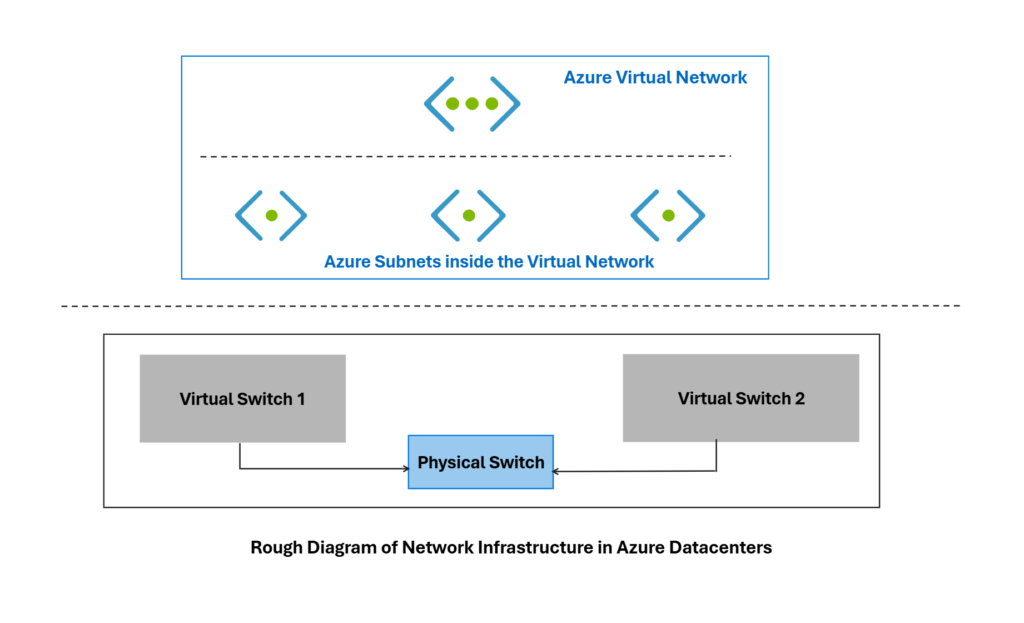
An Azure Subnet is a logical subdivision of a network address space that allows network assets like servers, databases, VDI’s to connect and communicate with one another. The entire solution is build on the top of network virtualization in Azure datacenters as shown below.
Each subnet contains a defined IP address range and hosts Azure resources such as:
- Virtual Machines
- Load Balancers
- Application Gateways
- Private Endpoints
By dividing a network into subnets, organizations gain better control over:
- Security policies
- Traffic flow
- Resource organization
- Network monitoring
In real-world cloud architectures, different application layers are typically placed in separate subnets to ensure proper isolation and security.
Example structure:
- Web Subnet
- Application Subnet
- Database Subnet
- Management Subnet
Each subnet represents a logical boundary within the cloud network.
Address Space vs Address Range in Azure Subnets
One of the most important concepts when working with Azure Subnets is understanding the difference between address space and subnet address range.
Address Space
The address space represents the total IP range available for the virtual network environment.
Example:
- 10.0.0.0/16
This large range provides thousands of IP addresses that can later be divided into smaller subnet segments.
Subnet Address Range
A subnet address range is a smaller portion of the overall address space allocated to a specific subnet.
Example:
- 10.0.1.0/24
This subnet range contains a limited number of IP addresses available for assignment to resources deployed within that subnet.
Multiple subnets can be created by dividing the larger address space into smaller blocks.
Example subnet ranges:
- 10.0.1.0/24
- 10.0.2.0/24
- 10.0.3.0/24
Each subnet operates independently but remains part of the larger network architecture.
Understanding CIDR Notation
Azure networking uses CIDR notation (Classless Inter-Domain Routing) to represent IP ranges.
CIDR notation uses the following format:
IP Address / Prefix Length
Example:
10.0.1.0/24
The prefix number defines how many bits of the address represent the network portion.
Common CIDR ranges include:
| CIDR | Number of IP Addresses |
|---|---|
| /16 | 65,536 |
| /24 | 256 |
| /26 | 64 |
| /28 | 16 |
A larger prefix value results in a smaller subnet size.
For example:
/24 = larger subnet
/28 = smaller subnet
CIDR allows cloud engineers to design networks that are flexible and scalable while avoiding wasted IP space.
Reserved IP Addresses in Azure Subnets
Every Azure subnet automatically reserves five IP addresses.
These addresses cannot be assigned to resources.
For example in Azure subnet like that :
- 10.0.1.0/24
We will have five IP Addresses reserved for the following purposes:
| IP | Purpose |
|---|---|
| First address | Network identifier |
| Second address | Azure default gateway |
| Third address | Azure DNS |
| Fourth address | Reserved for Azure |
| Last address | Broadcast |
Because of these reservations, a /24 subnet containing 256 addresses provides 251 usable IP addresses. Understanding this limitation is important when designing subnet sizes for production environments.
Subnet Design Best Practices
Well-designed Azure Subnets improve both security and operational efficiency.
A common practice is to separate application layers into dedicated subnets.
Example architecture:
- Web Tier Subnet
- Application Tier Subnet
- Database Tier Subnet
- Management Subnet
Benefits include:
- Security isolation between services
- Easier network monitoring
- Simplified policy enforcement
- Better traffic control
Subnet segmentation is widely used in enterprise cloud environments to maintain a structured and secure infrastructure.
