

What are Azure Virtual Networks?
Azure Virtual Networks (Azure VNet) is the foundational networking service in Microsoft Azure. Every virtual machine, application service, load balancer, firewall, and private endpoint relies on a properly designed Azure Virtual Network. Without structured network planning, cloud deployments quickly become insecure, unscalable, and difficult to manage.
This guide explains Azure Virtual Network architecture in practical, real-world terms. You will understand address space planning, subnet design, reserved IP addresses, traffic control, and enterprise architecture considerations. Whether you are beginning your cloud journey or designing production-grade systems, this article lays the foundation for your networking knowledge.
To understand how resources like these are managed on Azure, read here
What is Azure Virtual Network?
Azure Virtual Network is a logically isolated network in Azure that enables secure communication between cloud resources. It provides private IP addressing, subnet segmentation, routing control, and secure connectivity to on-premises networks.
In simple terms, Azure VNet works like a traditional data center network — but in a fully software-defined cloud model.
With Azure VNet, you can:
- Deploy virtual machines securely
- Isolate workloads using subnets
- Control traffic using Network Security Groups (NSG)
- Connect to on-premises networks using VPN or ExpressRoute
- Enable private communication between Azure services
Azure Virtual Network forms the networking layer of Azure infrastructure architecture. The diagram below is just a neutral, basic understanding of a VNET.
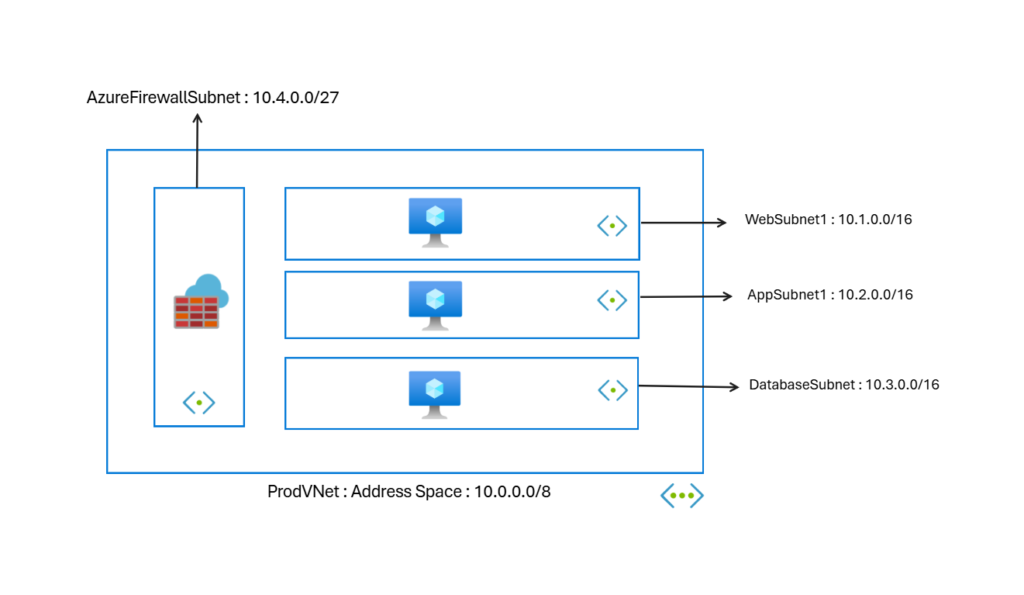
Core Components of Azure Virtual Network Architecture
To design a strong Azure Virtual Network, you must understand its core building blocks.
Address Space (CIDR Planning)
Every Azure Virtual Network requires an address space defined using CIDR notation.
Example:
10.0.0.0/8
This defines the total IP range available inside the VNet.
Why address planning matters:
- Prevents overlapping IP conflicts
- Enables future scaling
- Supports hybrid connectivity
- Ensures structured subnet segmentation
Poor address planning is one of the most common production mistakes in Azure networking.
When designing enterprise Azure VNet environments, always:
- Choose large enough address blocks
- Avoid overlaps with on-prem networks
- Reserve IP ranges for future expansion
Subnets in Azure Virtual Network
Subnets divide the VNet into smaller logical network segments.
Example:
- 10.1.0.0/16 -> Web Subnet
- 10.2.00/16 ->Application Subnet
- 10.3.0.0/16 ->Database Subnet
- 10.4.0.0/27 -> Azure Firewall Subnet
Subnets provide:
- Workload isolation: Isolates workloads that need special controls. For example, high-risk assets like databases.
- Traffic segmentation: Gives a clear network design, security, and effective routing.
- Security boundary control: Implementation of essential security controls at subnet levels.
- Architecture clarity: Defines the overall distribution of IT assets on the network.
In production environments, never place all resources in a single subnet. Always separate workloads logically.
Reserved IP Addresses in Azure Subnets (Critical Concept)
One of the most misunderstood topics in Azure Virtual Network is reserved IP addresses.
Azure reserves five IP addresses in every subnet.
For example, in an Azure VNet subnet:
10.0.1.0/24
Azure reserves:
- 10.0.1.0 → Network address
- 10.0.1.1 → Default gateway
- 10.0.1.2 → Azure internal DNS
- 10.0.1.3 → Reserved for future use
- 10.0.1.255 → Broadcast address
These IP addresses cannot be assigned to virtual machines or services.
Why does Azure reserve these IP addresses?
- To manage internal routing
- To provide gateway services
- To maintain DNS functionality
- To ensure network stability
This directly affects subnet capacity planning.
For a /24 subnet:
Total IP addresses = 256
Usable IP addresses = 251
When designing production VNets, always subtract five reserved IP addresses from the total capacity.
How Azure Virtual Network Handles Traffic
Azure Virtual Network automatically enables communication between resources within the same VNet. However, traffic control depends on additional components.
By default:
- Resources in the same subnet can communicate freely
- Subnets within the same VNet can communicate
- Outbound internet access is allowed
To control traffic, Azure uses:
- Network Security Groups (NSG)
- Route Tables (User-Defined Routes)
- Azure Firewall
- Private Endpoints
Proper traffic management is essential for a secure architecture.
Azure Virtual Network and Hybrid Connectivity
Azure VNet supports hybrid cloud connectivity through:
- VPN Gateway
- ExpressRoute
- VNet Peering
Hybrid connectivity allows:
- Secure communication with on-premises networks
- Multi-region architecture
- Cross-VNet communication
- Enterprise-level network extension
When planning hybrid networks, always ensure:
- No overlapping IP ranges
- Structured subnet layout
- Proper gateway subnet allocation
Real-World Azure Virtual Network Design Considerations
Designing Azure VNet for production requires architectural thinking.
Plan Address Space for Growth
Never use very small CIDR blocks in enterprise deployments. Future scaling becomes difficult.
Separate Workloads
Use different subnets for:
- Web tier
- Application tier
- Database tier
- Management services
This improves security and governance.
Implement Security Early
Attach Network Security Groups to:
- Subnets
- Network Interfaces
Never rely on default open communication.
Document Network Architecture
Maintain documentation for:
- Address ranges
- Subnet purpose
- Reserved space
- Connectivity design
Enterprise cloud design requires visibility.
Common Azure Virtual Network Mistakes
Many beginners and even intermediate engineers make these errors:
- Overlapping address ranges
- Using very small subnets
- Ignoring reserved IP addresses
- Placing all workloads in one subnet
- Not planning hybrid connectivity
- Forgetting gateway subnet requirements
Avoiding these mistakes significantly improves cloud stability.
Azure Virtual Network vs Traditional Networking
Traditional data centers require:
- Physical routers
- Switches
- Hardware firewalls
Azure VNet provides:
- Software-defined networking
- Built-in isolation
- Automated routing
- Scalable architecture
However, the fundamentals of networking remain the same. CIDR planning, subnetting, and traffic segmentation remain critical skills.
Why Azure Virtual Network is Foundational for Azure Infrastructure
Every Azure Virtual Machine requires a subnet inside a VNet.
Azure private endpoints are always attached to a VNet.
All secure architectures begin with VNet design.
Without a strong Azure VNet architecture:
- Compute becomes exposed
- Security becomes weak
- Governance becomes difficult
- Scaling becomes complex
Networking is not optional. It is foundational.
Frequently Asked Questions (FAQ)
How many IP addresses does Azure reserve in each subnet?
Azure reserves five IP addresses in every subnet.
Can I change Azure reserved IP addresses?
No. Azure automatically reserves them for internal networking functions.
Can I expand a VNet address space later?
Yes, but only if there are no overlapping conflicts.
What happens if the subnet runs out of IP addresses?
New resources cannot be deployed. Proper subnet sizing prevents this issue.
Conclusion
Azure VNet is the backbone of secure and scalable cloud architecture. Understanding address space planning, subnet segmentation, reserved IP addresses, and traffic control ensures that your Azure deployments remain stable and production-ready.
Strong Azure VNet design reduces security risks, simplifies hybrid connectivity, and prepares your infrastructure for long-term growth.
If you want to implement Azure VNet step-by-step using the portal, PowerShell, or Bicep, continue to the hands-on deployment guide.
